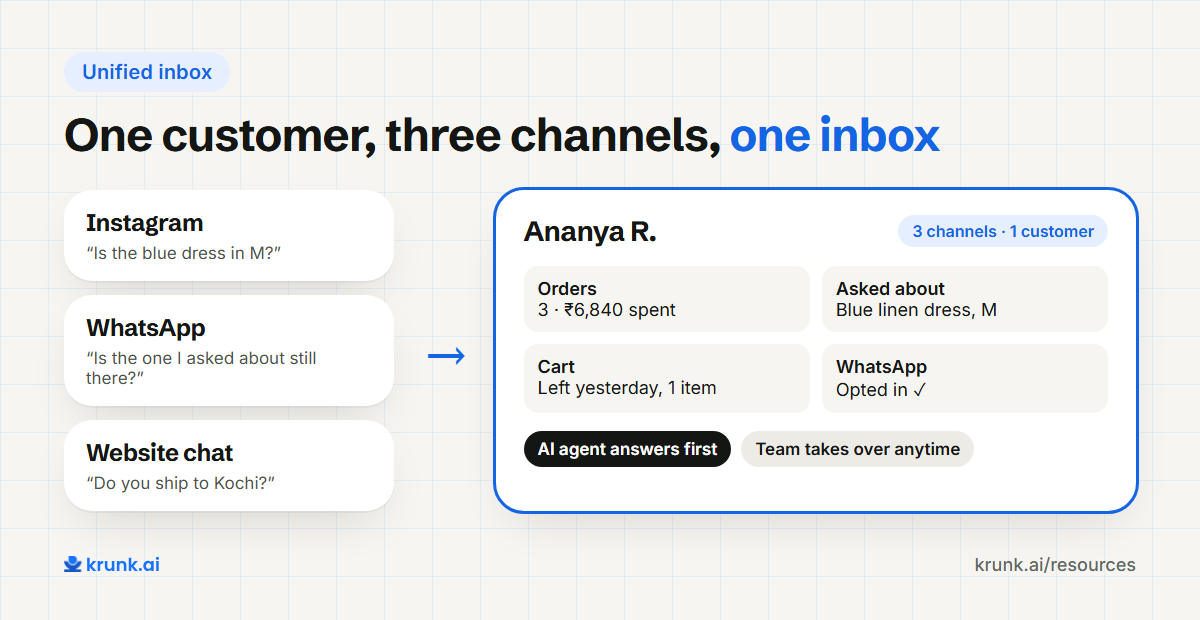
A shopper asks about a dress on Instagram on Monday. On Wednesday she messages on WhatsApp: "Is the one I asked about still available?" Your WhatsApp team has no idea what she asked about. She explains again. Or she doesn't, and buys somewhere else.
This happens because most D2C brands run each channel in its own app, often on its own phone. The fix is a unified inbox: every conversation, from every channel, in one place, next to what you know about the customer. Put an ecommerce CRM underneath it and you can see who she is, what she bought and what she asked last time.
This guide explains what a unified inbox and ecommerce CRM are, what they should show, how to set one up, and how AI agents change the way your team uses it.
In this guide:
- The problem with separate apps
- What a unified inbox is
- What an ecommerce CRM should show
- Where the AI agent fits
- Setting it up: a 5-step plan
- Choosing a tool
- What to measure
- FAQ
1. The problem with separate apps
When WhatsApp, Instagram, website chat and email each live in their own tool:
- Customers repeat themselves, because no one sees the earlier chat.
- Messages get missed, because nobody checks the fifth app.
- Answers don't match, because two people quoted two different delivery times.
- You can't measure anything, because there's no single count of conversations, replies or sales.
- Handovers are messy, especially when someone is on leave and the WhatsApp phone is in their bag.
2. What a unified inbox is
A unified inbox (also called an omnichannel inbox) brings every customer message into one screen:
- WhatsApp (through the WhatsApp Business Platform),
- Instagram DMs and often comments,
- Website chat,
- sometimes email and Facebook Messenger.
Each conversation shows which channel it came from, and if the same person writes on two channels, the conversations are joined into one customer.
3. What an ecommerce CRM should show
An inbox shows messages. An ecommerce CRM shows the customer. Next to each conversation you want:
| Field | Why it helps |
|---|---|
| Orders and their status | Answer "where is my order?" without switching apps |
| Total spent and order count | Treat a fifth-time buyer differently from a first-time visitor |
| Products viewed or asked about | Pick up where the last chat left off |
| Cart status | Know if they abandoned a cart yesterday |
| Channel and opt-in status | Know if you're allowed to message them on WhatsApp |
| Tags and notes | "Prefers Hindi", "Wholesale enquiry", "Had a damaged parcel" |
| Conversation history | Every message, on every channel, in order |
For a D2C brand on Shopify, most of this comes straight from the store. The CRM should sync it, not ask you to type it.
4. Where the AI agent fits
A unified inbox used to mean a team of people answering faster. Today it usually means an AI agent answers first, and people step in when they're needed.
That changes the team's day:
- The agent handles the repeated questions: product details, sizes, stock, order status, policies, at any hour.
- People handle what needs judgement: complaints, damaged products, special requests, bulk orders.
- Handovers keep the context: when the agent passes a chat on, the team sees the full conversation and the customer's orders, so nobody asks the shopper to repeat anything.
- The team can take over any chat at any time, and hand it back.
The important part is that the agent and the team work in the same inbox. If the AI lives in one tool and your team in another, you've rebuilt the problem you were trying to fix.
Across the brands we work with, the agent closes about 91% of support queries on its own; the rest reach the team with the full chat attached.
5. Setting it up: a 5-step plan
- List your channels and who answers each today. Include the "personal phone" ones.
- Move WhatsApp to the Business Platform so several people (and an agent) can share one number. WhatsApp commerce in India: the 2026 guide →
- Connect Instagram and website chat to the same inbox.
- Connect your store so orders and products appear next to each conversation.
- Agree on rules: what the agent answers, what goes to people, who owns which kind of request, and your target reply time.
Most brands can do this in a week or two. The longest step is usually the WhatsApp Business Platform setup: Meta's business verification usually takes a few days, and sometimes up to two weeks.
6. Choosing a tool
There are three kinds of tools, and they suit different brands:
| Type | Examples | Best for |
|---|---|---|
| Helpdesk | Gorgias, Freshdesk, Zoho Desk | Large support teams working through tickets |
| WhatsApp inbox (BSP tools) | WATI, Interakt, Gallabox | Brands mainly on WhatsApp, with campaigns |
| AI agent + CRM | Krunk | D2C brands that want an agent to answer first on WhatsApp, Instagram and web, with the team in the same inbox |
Questions to ask any vendor:
- Does the same customer on two channels show as one person?
- Does the inbox show live orders from my store?
- Can the AI and my team work in the same conversation?
- Can I export my customer data if I leave?
Next step
See how Krunk's inbox works →7. What to measure
- First reply time, by channel and by hour.
- Resolution without a human: share of conversations the agent closes on its own.
- Handover time: how long a handed-over chat waits for a person.
- Revenue from conversations: orders placed after a chat.
- Repeat contacts: customers who had to write twice about the same thing. This should fall.
FAQ
What is a unified inbox?
One screen where your team sees and answers messages from WhatsApp, Instagram, website chat and other channels, with each customer's history in one place.
What is an ecommerce CRM?
A customer database built for online stores: it shows each customer's orders, spend, carts and conversations, synced from your store.
Do small D2C brands need a CRM?
Once you get more messages than one person can handle, or you sell on more than one channel, yes. Before that, your store's customer list may be enough.
Is a unified inbox the same as omnichannel support?
Nearly. Omnichannel support is the goal (consistent help on every channel); a unified inbox is the tool that makes it possible.
Can I keep using the WhatsApp Business App with a unified inbox?
Yes, now you can. Meta's "coexistence" option lets one number run on both the WhatsApp Business App and the Business Platform, set up through your WhatsApp partner, and it works in India. A few app features work differently once the number is connected, so check with your partner before you switch.