Every Shopify app now says it has AI. Some of that AI saves you hours a week. Some of it is a text box that writes product descriptions you'll rewrite anyway.
This guide sorts Shopify AI tools by the job they do, so you can see where AI actually helps a D2C brand, what Shopify already gives you for free, and when it's worth paying for an app. We make one of the tools in this list (Krunk), and we've said so where it appears.
In this guide:
- Start with what Shopify gives you for free
- The six jobs where AI pays off
- Tools for each job
- A simple stack by store size
- Before you install anything
- FAQ
1. Start with what Shopify gives you for free
Before installing anything, use what's already in your admin. Shopify Magic is free on every plan, though a few features depend on your plan.
- Shopify Magic: writes product descriptions, email subject lines and replies, edits product images (background removal, new backgrounds).
- Sidekick: an AI assistant inside your admin. Ask it things like "which products sold best last month?" or "set up a discount for Diwali", and it helps you do it.
- Shopify Inbox: free chat for your store, with AI-suggested replies (English only).
- Shopify Search & Discovery: free app for search filters, search boosts and product recommendations.
- Agentic storefronts / Shopify Catalog: makes your products findable by AI shopping assistants. Is your Shopify store agent-ready? →
For a new store, these may be all you need for months.
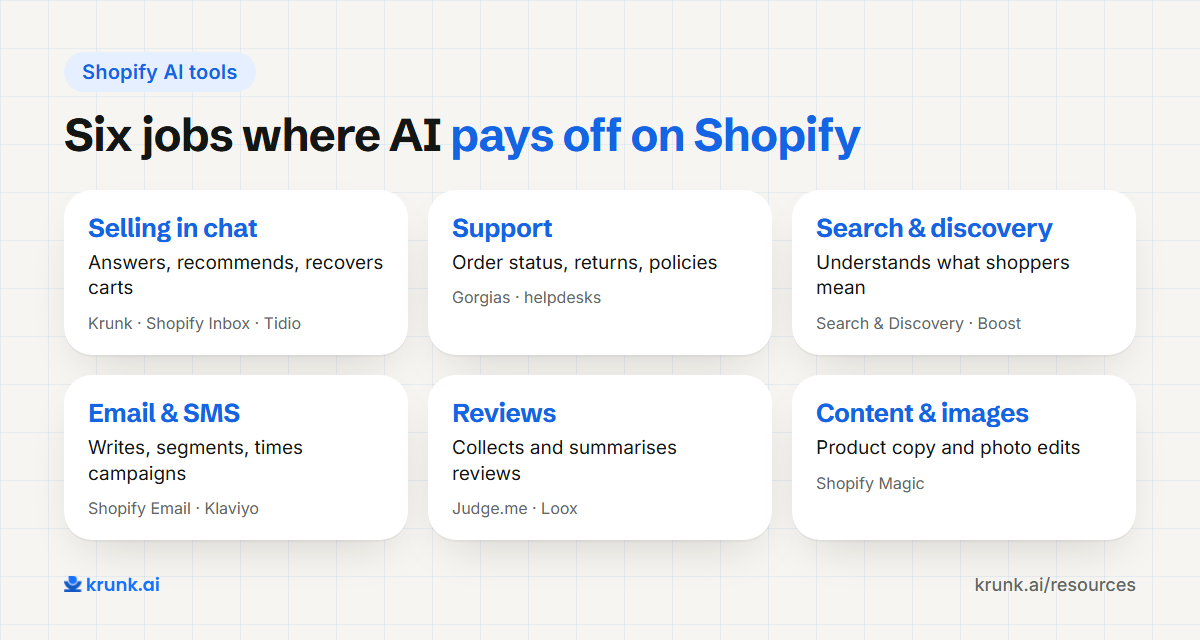
2. The six jobs where AI pays off
| Job | What AI does | Pays off when |
|---|---|---|
| Selling in chat | Answers product questions, recommends, recovers carts | You get lots of questions on WhatsApp, Instagram or site chat |
| Support | Answers order status, returns, policies | Your team spends hours on "where is my order?" |
| Search & discovery | Understands "red kurta for wedding under 2k" | You have more than ~100 products |
| Email & SMS marketing | Writes, segments and times campaigns | You have a list worth emailing |
| Reviews | Collects, summarises and answers reviews | You have steady orders |
| Content & images | Product copy, photos, ads | You launch products often |
3. Tools for each job
Checked in November 2026. Check each app's Shopify App Store listing for current pricing before you install.
Selling in chat
Krunk (our product): an AI sales agent that syncs with your Shopify catalog, stock, orders and discounts, and answers on WhatsApp, Instagram and your website from one inbox. Built for Indian D2C brands; set up with you. Install Krunk for Shopify →
Shopify Inbox (free): fine for a small store answering chats by hand with AI-suggested replies. It doesn't run on WhatsApp or Instagram.
Tidio: live chat plus the Lyro AI agent, which answers on your site, WhatsApp, Instagram and Messenger from the content you give it. Lyro is billed separately, per AI conversation.
Support
Gorgias: the best-known Shopify helpdesk, with AI that answers and closes common tickets, and every customer's orders in view. Pricing is per ticket, plus a fee for each conversation the AI resolves.
Richpanel and eDesk: helpdesks with AI for order questions. Richpanel has a self-service portal where shoppers can track, cancel or return orders; eDesk's AI answers from your store policies and order data.
Search & discovery
Shopify Search & Discovery (free): start here.
Searchanise, Boost AI Search & Discovery and Algolia AI Search & Discovery: smarter search, typo handling and merchandising when your catalog grows.
For conversational discovery (a shopper describes what they need and gets a few good options), a chat agent often does better than a search bar. AI product discovery, explained →
Email & SMS marketing
Shopify Email (free tier): simple campaigns with AI-written subject lines.
Klaviyo: the standard for growing Shopify brands, with AI for segments, send times and content.
For India, WhatsApp often outperforms email for campaigns. WhatsApp commerce in India: the 2026 guide →
Reviews
Judge.me (free plan; AI review summaries, replies and translations on the $15/month Awesome plan), Loox and Yotpo: collect photo reviews, and all three now use AI to summarise or highlight reviews on the product page.
Content & images
Shopify Magic (free) covers most product descriptions and simple image edits. Dedicated AI photo tools are worth it only if you shoot a lot of products.
4. A simple stack by store size
| Store size | Stack |
|---|---|
| Just started (under ~100 orders/month) | Shopify Magic, Sidekick, Shopify Inbox, Search & Discovery, Judge.me free |
| Growing (~100–2,000 orders/month) | Add an AI sales agent on WhatsApp/Instagram, an email tool, and WhatsApp cart recovery |
| Scaling (2,000+ orders/month) | Add a helpdesk for your support team, advanced search, and connect chat + helpdesk so customers aren't asked twice |
The point is to add tools when a real problem appears, not because a competitor uses them.
5. Before you install anything
- Check speed: every app that adds scripts to your storefront can slow it down. Test with PageSpeed Insights before and after.
- Check data access: an AI tool that answers shoppers needs your live catalog and orders. One that works from a copy will quote wrong prices.
- Check who can see the conversations: you should be able to read every chat and take over.
- Check the real price at your volume, including AI usage limits, per-resolution fees and WhatsApp charges.
- Uninstall cleanly: remove leftover code when you remove an app.
FAQ
Does Shopify have built-in AI?
Yes. Shopify Magic and Sidekick are built into the admin and free on every plan. A few features, such as building apps with Sidekick, need the Grow plan or higher.
What are the best free AI tools for Shopify?
Shopify Magic, Sidekick, Shopify Inbox and Shopify Search & Discovery are free. Many apps also have free plans with limits.
Can AI answer customer questions on my Shopify store?
Yes. A chat agent connected to your Shopify catalog and orders can answer product questions, recommend items and give order status on your website, WhatsApp and Instagram.
Do AI apps slow down my Shopify store?
Some do, if they add heavy scripts. Check your speed before and after installing, and prefer apps that load their widget only when needed.