Most shoppers who add something to their cart don't buy it. Industry studies put the abandonment rate at around 70% (Baymard Institute's average across 50 studies is 70.22%), and on mobile it's usually higher.
For Indian D2C brands, WhatsApp is the obvious place to win some of those shoppers back. People open WhatsApp messages far more often than emails, and they can reply. That last part is what most cart recovery setups waste.
This guide covers how WhatsApp cart recovery works, the rules you need to follow, what to send and when, and how to turn a reminder into a conversation that actually closes the sale.
In this guide:
- Why shoppers leave
- How WhatsApp cart recovery works
- Meta's rules in plain words
- Timing: when to send
- Message templates that work
- From reminder to conversation
- COD confirmation: the hidden win
- What to measure
- FAQ
1. Why shoppers leave
A reminder only works if it answers the reason the shopper left. The common reasons:
- Extra costs at checkout: shipping or COD fees they didn't expect.
- Just browsing / comparing: they wanted to check another site first.
- A question nobody answered: "Will this fit?", "Is it original?", "When will it reach Jaipur?"
- Payment trouble: a UPI failure or an OTP that never came.
- Distraction: a call, a meeting, a child.
Notice that three of the five are really unanswered questions. A reminder that says "You left something behind!" does nothing for them. A message that invites the question, and answers it in seconds, does.
2. How WhatsApp cart recovery works
- The shopper gives their number at checkout (or logs in) and opts in to WhatsApp messages.
- Your store notices the cart wasn't completed after a set time.
- A pre-approved template message is sent on WhatsApp with the product and a link back to the cart.
- The shopper taps the link and buys, or replies with a question.
- Someone (or an AI agent) answers the reply, inside WhatsApp's 24-hour window.
Steps 1–4 are what most cart recovery apps do. Step 5 is where most of the extra sales are, and it's usually missing.
3. Meta's rules in plain words
Checked against Meta's WhatsApp Business Platform pricing and policy pages in November 2026.
- You need opt-in. The shopper must agree to receive WhatsApp messages from you. A clear checkbox or line at checkout is the usual way.
- Cart reminders are "marketing" templates. They must be approved by Meta first, and they're the most expensive message category.
- Templates are fixed text with variables. You can fill in the name, product and link, but not rewrite the message each time.
- Once the shopper replies, the 24-hour window opens. Inside it, you can reply freely with normal messages. Meta gives each number 1,000 free service replies a month, then charges for them at the utility rate (about ₹0.115 in India).
- Too many unwanted messages hurt your number. If shoppers block or report you, your quality rating drops and Meta stops raising your sending limit. Repeated breaches can get your account restricted.
The practical takeaway: send fewer, better reminders, and make sure someone is ready to answer when shoppers reply.
4. Timing: when to send
There's no universal best time, but these starting points work for most D2C brands:
| Message | When | Why |
|---|---|---|
| Reminder 1 | 30–60 minutes after the cart is left | The shopper still remembers what they were buying |
| Reminder 2 (optional) | 20–24 hours later | Catches people who were busy; add a reason to come back |
| Stop | After two | A third message is more likely to get you blocked than get a sale |
Avoid sending late at night unless the cart itself was late at night. Test your own timing for a month, then adjust.
5. Message templates that work
Good templates are short, specific and give the shopper an easy reason to reply.
Reminder 1: helpful, no discount
Hi {{name}}, you left the {{product}} in your cart. It's still available in {{size}}. Any questions about fit or delivery? Just reply here. 👉 {{cart_link}}
Reminder 2: a reason to come back
Hi {{name}}, the {{product}} you picked is running low in {{size}}. Here's your cart, saved for you: {{cart_link}}. Reply if you'd like help choosing.
When to add a discount: only on reminder 2, and only if your margins allow it. If every cart gets a discount, shoppers learn to abandon carts on purpose.
Meta reviews every template before you can use it, so submit yours and test it before launch.
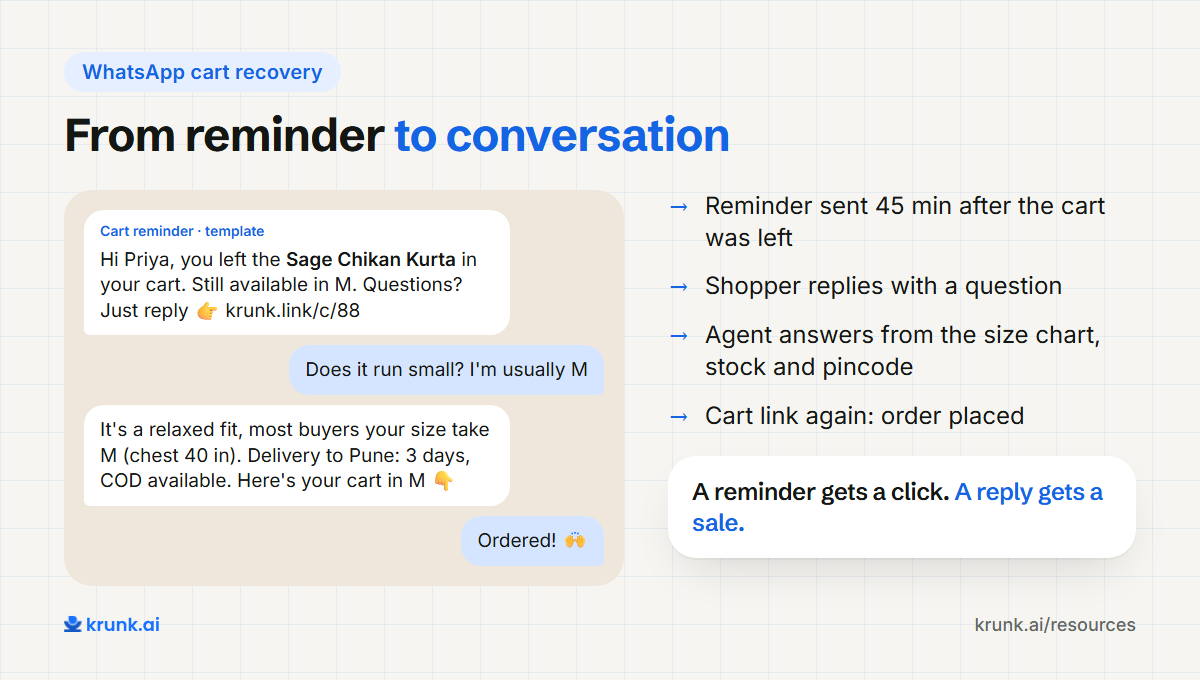
6. From reminder to conversation
This is the difference between a cart recovery tool and a cart recovery conversation.
When a shopper replies "does this run small?", the old setup sends that message to a shared inbox, where it waits until someone gets to it. By then the shopper has bought elsewhere.
An AI sales agent connected to your store answers immediately:
- it reads the product's size chart and reviews to answer the fit question;
- it checks stock for the other size if needed;
- it gives delivery time for the shopper's pincode;
- it sends the cart link again, or a link with the other size;
- it hands over to your team if the shopper has a problem it can't solve.
7. COD confirmation: the hidden win
In India, a large share of orders are still cash on delivery, and many COD orders are refused at the door. That costs you shipping both ways.
A WhatsApp message right after a COD order — "Please confirm your order of {{product}} to {{city}}: reply YES to confirm" — filters out orders placed by mistake and gives the shopper a chance to switch to prepaid, often with a small incentive.
This is a utility message (Meta's category for confirming or updating an order), so it costs much less than marketing: about ₹0.115 against ₹0.86 in India. Keep any prepaid offer out of the template, or Meta may class it as marketing. And when the shopper replies with a question instead of YES, the same agent can answer it.
8. What to measure
- Recovery rate: carts recovered ÷ carts that received a reminder.
- Reply rate: how many shoppers replied instead of only clicking.
- Revenue recovered: order value from recovered carts, minus discounts and message costs.
- Block / report rate: keep it close to zero. If it rises, send fewer reminders.
- COD confirmation rate and RTO (return-to-origin) rate before and after.
FAQ
Is WhatsApp better than email for cart recovery?
In India, usually yes. WhatsApp messages are opened far more often than emails. Email is still useful as a cheaper second channel, especially for shoppers who didn't opt in to WhatsApp.
How much does a WhatsApp cart reminder cost?
Meta charges per marketing message delivered: about ₹0.86 plus GST in India, from October 2026. Your WhatsApp partner may add a fee.
Do I need the WhatsApp Business API for cart recovery?
Yes. Automated cart reminders need the WhatsApp Business Platform (the "API"), set up through a Meta partner. The free WhatsApp Business App can't send them automatically.
Can I send cart reminders without opt-in?
No. Meta requires opt-in for business-started messages, and sending without it risks your number being restricted.
How does this work on Shopify?
Shopify knows when a checkout is abandoned. A WhatsApp tool connected to Shopify picks that up and sends the template. Is your Shopify store ready for AI agents? →